Text alerts from Rabbi Eisemann's 6th Grade
Rabbi Eisemann's 6th Grade can text you the things worth knowing the same day. The texts come from Rabbi Eisemann's 6th Grade, from the number (888) 799-9289, sent through AcademIQ, the school’s management platform, on the school’s behalf. The program is called AcademIQ school alerts.
What the texts are about
- Absent — When my child is marked absent for the day.
- Late — When my child is marked late.
- Tests — When a test is posted, moved or cancelled.
- Conduct notices — When a conduct notice is coming home.
- Calendar changes — When school is closed, starts late or dismisses early.
- At-risk status — When my child is at risk of missing a trip or program they would otherwise earn.
- School messages — Texts the office sends to the class or the school.
- For staff: attendance confirmations — a teacher who texts in the class’s attendance gets a text back saying what was recorded.
The school decides which of these it sends; you only get the kinds the school sends.
Who gets texts
Only a mobile number whose owner said yes. Rabbi Eisemann's 6th Grade never sends a first text to ask whether you want texts, and nobody is asked to “reply YES”. A number is signed up in one of the ways below, every one of them started by the person who owns the phone or signed for it, and the school keeps a record of each: the number, the way, the time, the exact wording agreed to, and the address it was agreed from.
The ways to sign up
1. The sign-up page, with a code texted to you
Open the sign-up page, type your name and mobile number, tick the consent box and press Text me a code. A six-digit code is texted to the number; type it in and the number is signed up. The code proves the phone is yours — nothing is signed up without it.

2. An email invitation
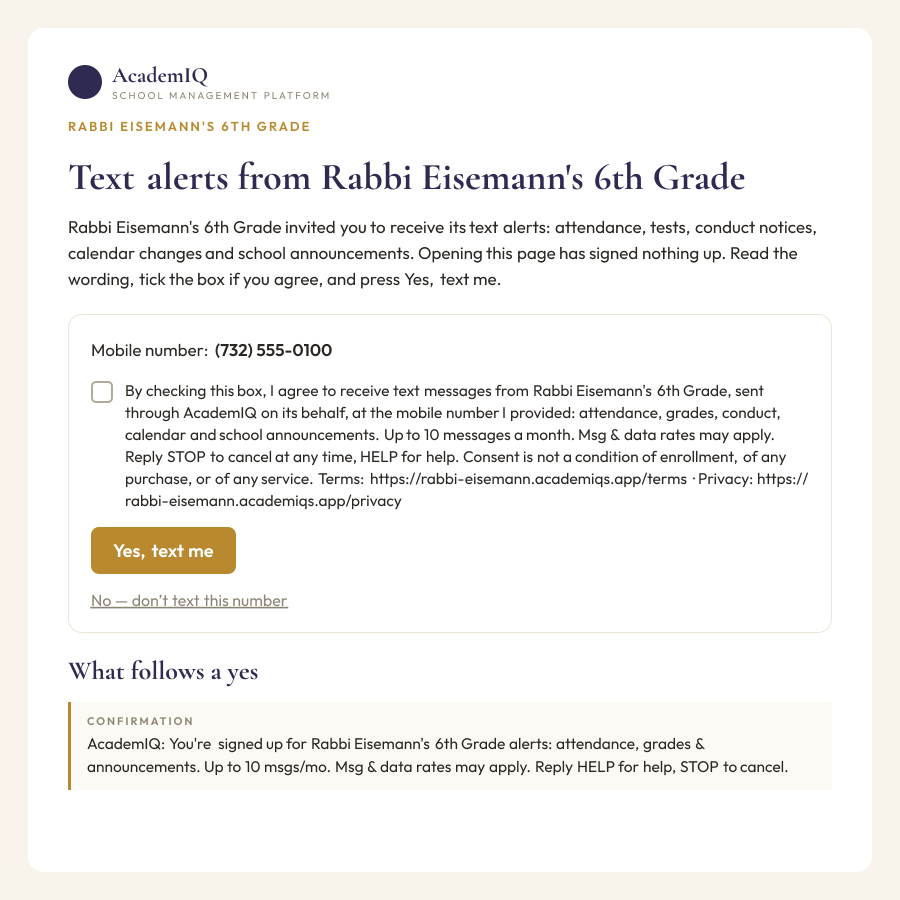
If the office has your email address, it may send you an invitation. The link opens a page that shows the school, the number on file (or asks for one), and the full consent wording with an unticked box. Nothing is signed up by opening the link — only by ticking the box and pressing Yes, text me. The same page has a “No — don’t text this number” choice.
3. Texting JOIN
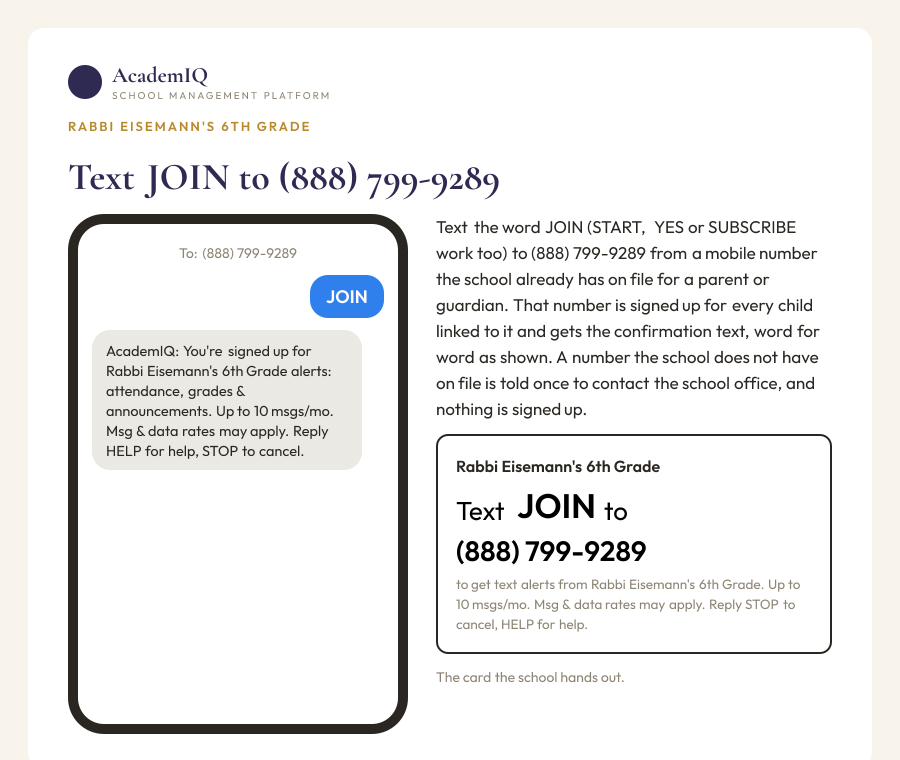
Text the word JOIN (START, YES or SUBSCRIBE work too) to (888) 799-9289. If the school has your mobile number on file for a parent or guardian, that number is signed up for every child linked to it and you get the confirmation text. If the school does not have the number on file, the reply says so once — “This number isn’t on file with Rabbi Eisemann's 6th Grade. Please contact the school office to add it.” — and nothing is signed up. The school hands this out on a card: print the JOIN card.
4. A signed paper form
The office can give you a paper form with the same consent wording, lines for your name, your mobile number, your relation to the student, your signature and the date. The office records the signed form and keeps it.

5. Staff
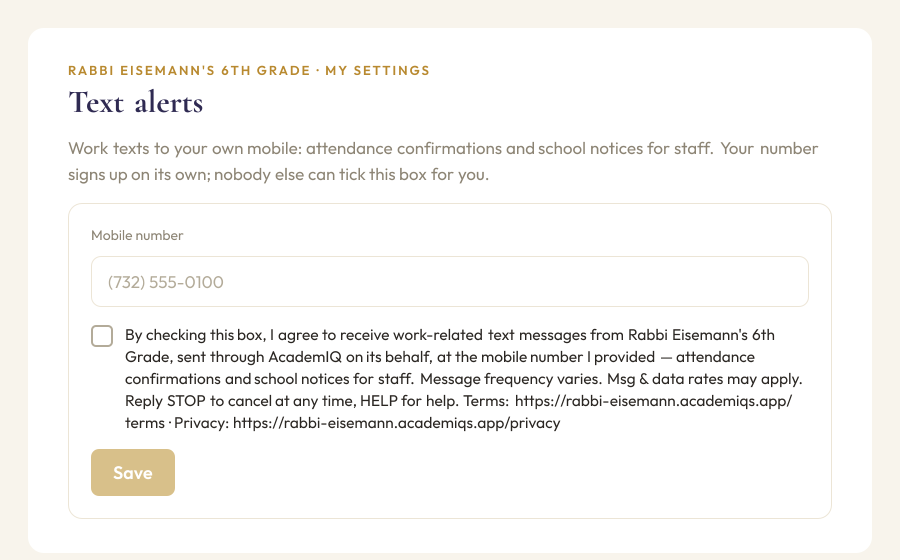
A teacher or office member signs up on their own profile in the school’s system — a mobile number and an unticked box with the staff wording. Staff texts are work texts: attendance confirmations and school notices for staff.
The wording you agree to
Beside every parent checkbox and on the paper formBy checking this box, I agree to receive text messages from Rabbi Eisemann's 6th Grade, sent through AcademIQ on its behalf, at the mobile number I provided: attendance, grades, conduct, calendar and school announcements. Up to 10 messages a month. Msg & data rates may apply. Reply STOP to cancel at any time, HELP for help. Consent is not a condition of enrollment, of any purchase, or of any service. Terms: https://rabbi-eisemann.academiqs.app/terms · Privacy: https://rabbi-eisemann.academiqs.app/privacy
Beside the staff checkboxBy checking this box, I agree to receive work-related text messages from Rabbi Eisemann's 6th Grade, sent through AcademIQ on its behalf, at the mobile number I provided — attendance confirmations and school notices for staff. Message frequency varies. Msg & data rates may apply. Reply STOP to cancel at any time, HELP for help. Terms: https://rabbi-eisemann.academiqs.app/terms · Privacy: https://rabbi-eisemann.academiqs.app/privacy
The text that confirms it
After a number is signed up, this one text goes to it, word for word:
ConfirmationAcademIQ: You're signed up for Rabbi Eisemann's 6th Grade alerts: attendance, grades & announcements. Up to 10 msgs/mo. Msg & data rates may apply. Reply HELP for help, STOP to cancel.
What the texts look like
Every text begins with AcademIQ and the school’s name, so you can tell what it is and whom it is from.
AcademIQ - Rabbi Eisemann's 6th Grade: Yosef was marked absent today, Oct 5. If this is a mistake, please call the office. Reply STOP to opt out
AcademIQ - Rabbi Eisemann's 6th Grade: Chumash Test #3 for 6A is on Thursday, Oct 9. Reply STOP to opt out
AcademIQ - Rabbi Eisemann's 6th Grade: School dismisses early on Friday, Oct 10, at 1:30 PM. Reply STOP to opt out
“Reply STOP to opt out” rides the first text to a number and then about once a month, not every text.
How often, and what it costs
Up to 10 messages a month from the school; message frequency varies with what happens at school. Msg & data rates may apply according to your own mobile plan — AcademIQ and the school charge you nothing. Consent is not a condition of enrollment, of any purchase, or of any service; everything the school offers works the same whether or not you get texts.
How to stop
- Reply STOP to any text. You get one reply and nothing after it. STOP turns off texts to your phone from every school on AcademIQ at once, not only the one that sent the message. (UNSUBSCRIBE, CANCEL, END, QUIT and STOPALL do the same.)
- Staff: untick the box on your profile.
- Ask the office: the school office can take your number off.
The STOP replyYou have been unsubscribed from AcademIQ school alerts and will receive no more texts. Reply START to resubscribe.
To start again after a STOP, text START to the same number. Only you can do that — the office cannot switch a number back on after its owner replied STOP.
The START replyYou are resubscribed to AcademIQ school alerts. Msg & data rates may apply. Reply STOP to opt out.
Help
Reply HELP (or INFO) to any text and you get:
The HELP replyAcademIQ school alerts for Rabbi Eisemann's 6th Grade. Call Rabbi Eisemann (848-210-7529). Help: support@academiqs.app. Msg & data rates may apply. Reply STOP to cancel.
For anything about your child or about a text you did or did not get, contact the school office. For the texting service itself, email support@academiqs.app.
The fine print
- Sender: Rabbi Eisemann's 6th Grade, from (888) 799-9289; platform: AcademIQ (Academiqs LLC).
- Terms of use, including the SMS terms.
- Privacy Policy. Mobile numbers and SMS consent are never sold or shared with third parties for marketing.
- Carriers are not liable for delayed or undelivered messages.